Creating good visuals used to be one of those tasks that sounded simple until you actually had to do it.
You opened Canva, searched through stock photos, moved a headline three pixels to the left, changed it back, questioned your entire brand identity, and somehow lost 45 minutes.
AI image generators changed that. But there is one catch: most people do not get weak AI images because the tool is useless. They get weak results because the prompt is too vague.
If you are a solopreneur, this matters. You probably need visuals for blog posts, landing pages, newsletters, ads, lead magnets, social media posts, product mockups, and maybe even short-form videos. You do not have time to wrestle with every image like it is a tiny digital octopus.
The good news is that writing better AI image prompts is not complicated. You just need a simple structure.
Why AI Image Prompts Matter for Solopreneurs
AI image prompts for solopreneurs matter because they help turn vague ideas into usable visuals faster.
When you run a business by yourself, every small creative task competes with something else. You might be writing a newsletter in the morning, updating a landing page after lunch, testing an ad before dinner, and trying to make tomorrow’s social post look less like an afterthought.
A strong prompt helps you create visuals that are more useful from the start. That can mean better blog thumbnails, cleaner social media graphics, faster ad creative testing, stronger product mockups, and landing pages that do not look like they were assembled during a caffeine emergency.
AI image tools are useful, but they are not mind readers. A prompt like “business person using laptop” will usually produce something generic. It might look fine, but fine is not always helpful.
A better prompt gives the tool direction. It explains what the image is about, where it takes place, what style it should use, and how the final result should be framed.
The better the instruction, the less the tool has to guess.
The Simple AI Image Prompt Formula
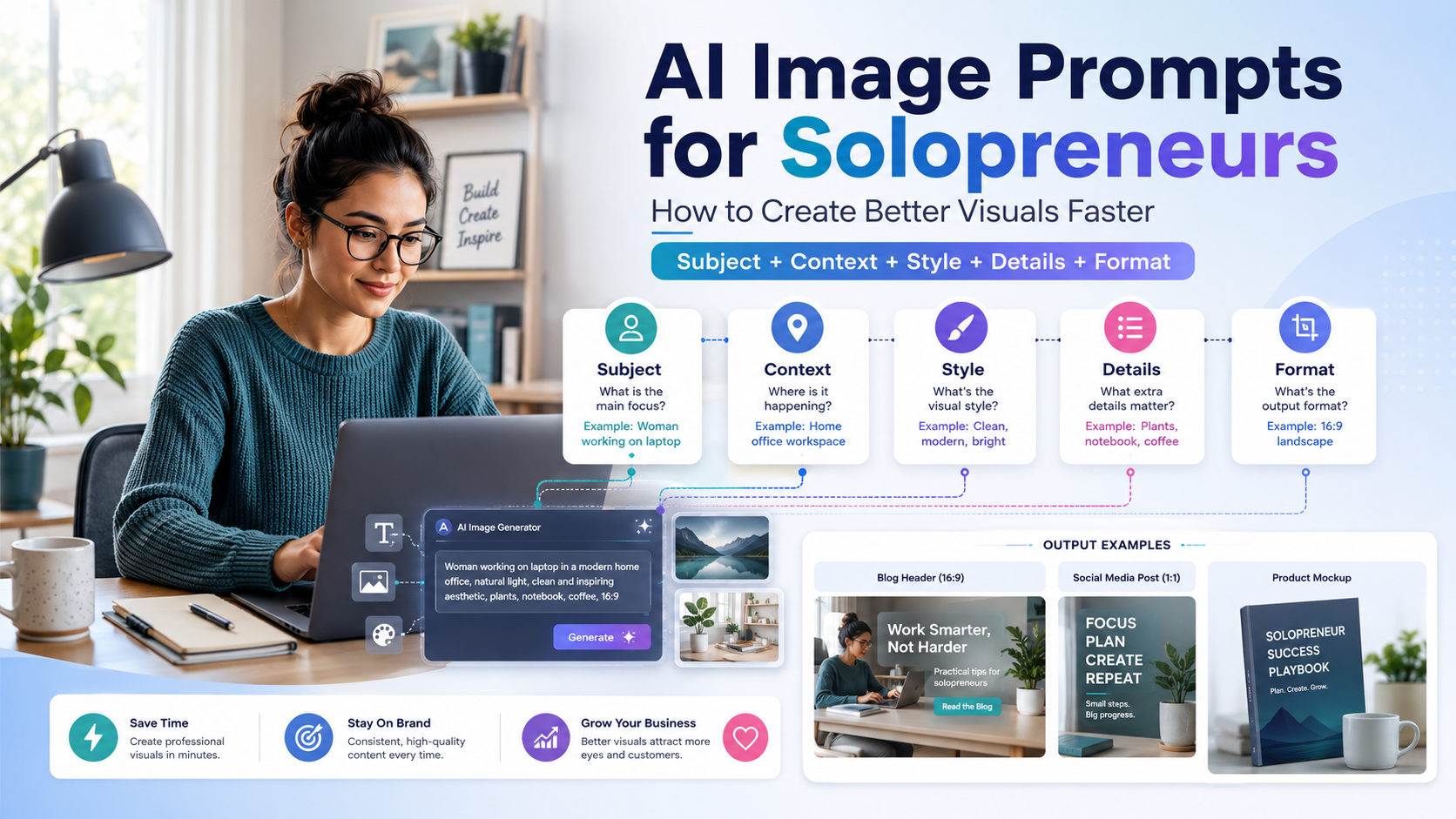
A good AI image prompt usually includes five parts:
Subject + Context + Style + Details + Format
That formula is simple enough to remember, but specific enough to improve almost every image you create.
Let’s break it down.
1. Subject
The subject is the main thing in the image.
For solopreneur content, your subject might be:
- A solo founder working at a desk
- A SaaS dashboard on a laptop screen
- A freelancer planning content
- A small business owner using automation tools
- A creator recording a podcast
- A digital product mockup
The key is to avoid being too broad.
Instead of writing:
entrepreneur workingTry:
solo founder working from a compact home officeInstead of:
business dashboardTry:
SaaS analytics dashboard displayed on a laptop screenSpecificity gives the AI something solid to build. A vague subject usually leads to a vague image.
2. Context
Context explains where the subject is and what is happening.
A weak prompt might say:
A solopreneur workingThat gives the AI very little to work with. The result could be anything: a person at a desk, a person standing in an office, a person staring intensely at a laptop for mysterious reasons.
A stronger version would be:
A solopreneur working at a minimalist desk in a small home office, planning an automated email campaign on a laptopNow the image has a story. The AI understands the environment, the task, and the business context.
Context is especially important for solopreneurs because your visuals often need to communicate a specific business idea quickly. You may be explaining productivity, automation, content planning, digital products, marketing, or client work. The image should support that message instead of floating around as generic decoration.
3. Style
Style controls the look and mood of the image.
This is where you tell the AI whether the image should feel like a realistic photo, a startup illustration, a clean website graphic, or a premium product mockup.
Useful style phrases include:
- Modern SaaS website illustration
- Clean editorial photography
- Minimalist flat illustration
- Realistic product photography
- Warm lifestyle photography
- Futuristic dashboard UI concept
- Soft studio lighting
- Premium startup brand aesthetic
For most business content, clean and readable visuals work better than chaotic ones. Unless your brand is intentionally loud, avoid prompts that create too much visual noise.
A solopreneur website, newsletter, or landing page usually needs clarity first. The image should make the content feel more professional, not fight the headline for attention.
4. Details
Details help the image feel intentional.
This is where you remove randomness.
Useful details might include:
- Neutral background
- Soft natural light
- Laptop with analytics dashboard
- Sticky notes on the wall
- Clean desk setup
- Blue and white SaaS-style interface
- No text in the image
- Professional but approachable mood
Without details, the AI fills in the blanks on its own. Sometimes that works. Sometimes it adds twelve fingers, floating screens, and a coffee cup that looks legally suspicious.
Details help you steer the result. They also help you avoid the weird little artifacts that make AI images look unfinished.
For business visuals, I usually recommend adding phrases like:
clean background
simple composition
no readable text
no logos
no distorted hands
uncluttered layout
These small instructions can save you a lot of cleanup later.
5. Format
Format tells the AI how the image should be framed.
This matters more than many people realize. A blog header, Instagram post, YouTube thumbnail, and landing page hero image should not all use the same composition.
Useful format phrases include:
- 16:9 blog header image
- Square social media post
- Vertical 9:16 story format
- Wide website hero image
- Product mockup on white background
- Close-up portrait
- Over-the-shoulder shot
- Centered composition with space for text
If you know where the image will be used, include that in the prompt.
For example, a blog header usually needs a wide composition. A social media post might need a centered subject. A landing page hero image may need empty space on one side for a headline and call-to-action button.
Format turns the prompt from “make something nice” into “make something I can actually use.”
Best AI Image Prompt Template for Blog Images
Blog images need to support the topic without overwhelming the page. They should be clear, relevant, and easy to understand at a glance.
Use this template:
Create a [format] image of [subject] in [context]. Use a [style] visual style with [details]. The image should feel [mood]. Avoid text, logos, distorted hands, and clutter.Example:
Create a 16:9 blog header image of a solo founder building an automated business workflow on a laptop in a clean home office. Use a modern SaaS editorial photography style with soft natural lighting, a minimalist desk, analytics dashboard elements, and a calm productive mood. Avoid text, logos, distorted hands, and clutter.This works well for blog posts about automation, productivity, SaaS tools, online business, AI workflows, and solopreneur systems.
The reason this prompt works is that it gives the AI a job. It does not just ask for a nice image. It asks for a specific image in a specific format with a specific business purpose.
Best AI Image Prompt Template for Social Media Visuals
Social media visuals need to be simple and scroll-stopping. That does not mean they need to scream. It means the composition should be clear enough for someone to understand quickly.
Use this template:
Create a square social media image showing [subject]. Use [style], strong composition, simple background, and enough empty space for a headline. The mood should be [mood]. Avoid text and logos.Example:
Create a square social media image showing a solopreneur managing multiple SaaS tools from one laptop dashboard. Use a clean startup-style illustration, strong composition, simple background, and enough empty space for a headline. The mood should be focused, modern, and efficient. Avoid text and logos.This kind of prompt gives you room to add your own text later in Canva, Figma, Adobe Express, or another editor.
That last part matters. Many AI tools still struggle with text inside images. If you need a headline, generate the background first, then add the text manually. It usually looks cleaner and more professional.
Best AI Image Prompt Template for Product Mockups
Product mockups are useful for SaaS reviews, digital products, online courses, templates, ebooks, lead magnets, and landing pages.
Use this template:
Create a realistic product mockup of [product type] displayed on [device or surface]. Use [style], [lighting], and [background]. The design should look modern, clean, and professional. Avoid readable text and brand logos.Example:
Create a realistic product mockup of a SaaS analytics dashboard displayed on a laptop screen. Use premium studio lighting, a clean desk background, and a modern startup aesthetic. The design should look clean, professional, and conversion-focused. Avoid readable text and brand logos.
For legal and branding reasons, avoid asking AI tools to recreate real dashboards from companies unless you have permission.
Instead of asking for a copy of a specific brand’s interface, describe the general concept:
abstract SaaS analytics dashboard
fictional project management interface
generic email automation dashboard
clean digital product mockup
You want the image to support your message, not accidentally imitate someone else’s product.
AI Image Prompt Examples for Solopreneur Content
Once you understand the formula, the next step is building a small library of prompts you can reuse. Think of these as starting points. Adjust the style, mood, colors, and format to match your brand.
Blog Header Prompt
A wide 16:9 editorial image of a solopreneur planning an AI-powered business workflow at a minimalist desk, laptop open with abstract automation dashboard elements, soft natural light, modern SaaS aesthetic, clean background, calm productive mood, no text, no logosUse this for articles about AI automation, productivity systems, content workflows, or online business tools.
Newsletter Visual Prompt
A clean illustration of a solo business owner organizing email automations, content calendar, and customer messages on one digital dashboard, modern flat design, soft colors, simple composition, professional and friendly mood, no textThis works well for newsletters, email marketing guides, and lead magnet visuals.
Landing Page Hero Prompt
A premium website hero image showing an AI automation workspace for solopreneurs, laptop dashboard, floating workflow nodes, clean SaaS interface elements, bright modern studio lighting, minimal background, space on the left for headline text, no logosThis prompt is useful when you need a hero image that leaves room for copy.
YouTube Thumbnail Background Prompt
A bold high-contrast background image of a solopreneur surrounded by AI workflow screens and automation icons, energetic startup style, dramatic lighting, clear central subject, empty space for large title text, no actual text in the imageThis gives you a strong background while keeping control over the final thumbnail text.
Digital Product Mockup Prompt
A realistic mockup of a digital automation playbook displayed on a tablet and laptop, clean desk setup, modern creator business aesthetic, warm lighting, professional layout, no readable text, no brand logosUse this for ebooks, Notion templates, courses, guides, and downloadable resources.
Common AI Image Prompt Mistakes to Avoid
AI image prompting gets easier once you understand what not to do. Most bad results come from a few predictable mistakes.
Mistake 1: Being Too Vague
A weak prompt might be:
AI business imageThat is not really a prompt. It is a shrug in text form.
A better version would be:
A modern editorial image of a solopreneur using AI automation tools to manage email, content, and customer workflows from a clean laptop dashboardThe second prompt gives the AI a subject, setting, purpose, and visual direction.
Vague prompts produce vague visuals. If your image looks generic, your prompt probably was too.
Mistake 2: Asking for Too Much at Once
It is tempting to cram the entire business strategy into one image.
For example:
A founder using AI to automate sales, marketing, customer support, content creation, invoicing, analytics, CRM, and social media in one imageThat prompt is a traffic jam with a marching band in the middle.
A better version would be:
A clean visual showing a solopreneur connecting email marketing, CRM, and content calendar tools through an AI automation workflowFocus wins.
The more ideas you force into one image, the harder it becomes for the AI to create something clean. Pick the main message and build around it.
Mistake 3: Forgetting the Use Case
A blog header, Instagram post, product mockup, and landing page hero image should not use the same prompt.
Always define the final use.
Are you creating a:
- Blog image?
- Social post?
- Hero section?
- Ad creative?
- Product mockup?
- Newsletter image?
- Thumbnail background?
The final format changes everything.
For example, a landing page hero image may need empty space on the left for copy. A YouTube thumbnail background may need stronger contrast. A product mockup may need a clean surface and realistic lighting.
When you include the use case in the prompt, the output becomes much easier to use.
Mistake 4: Letting the AI Add Text
Most AI image generators still struggle with readable text. Sometimes they get close. Sometimes they produce melted alphabet soup.
If you need text, add it later manually.
Use phrases like:
no text
no readable text
blank space for headline
empty space for title overlay
This gives you more control over the final design. It also helps your visuals look more polished and less obviously AI-generated.
How to Keep Your AI Visuals On-Brand
If you use AI images often, consistency matters.
One random image may look fine on its own. But if every blog post, newsletter, and social post has a completely different style, your brand can start to feel scattered.
You do not need a complicated brand system. A simple visual style guide is enough.
Include things like:
- Preferred image ratio
- Brand colors
- Lighting style
- Illustration or photography preference
- Background style
- Mood words
- Things to avoid
- Common prompt phrases
Here is an example brand direction:
Clean SaaS editorial style, soft natural lighting, minimalist workspaces, modern dashboards, calm productivity mood, neutral backgrounds, no clutter, no exaggerated futuristic elementsOnce you have a style phrase like this, reuse it across your prompts. It helps your visuals feel connected, even when you are creating them for different platforms.
You can also create a few reusable prompt endings, such as:
clean background, soft natural lighting, professional but approachable mood, no text, no logos, no clutteror:
modern startup aesthetic, simple composition, high-quality editorial look, blank space for headlineThese repeatable phrases become your visual shortcut.
Should Solopreneurs Use AI Images?
Yes, if they use them intentionally.
AI images are not a replacement for brand strategy. They are not a magic button for good taste. They also will not fix unclear messaging, weak offers, or landing pages that confuse people.
But they are excellent for speeding up content production, testing ideas, and creating visual assets when hiring a designer is not practical.
For solopreneurs, that is a big deal.
You can create a blog header without spending an hour searching for stock photos. You can test three ad directions before committing to one. You can create a product mockup before your full sales page is finished. You can make your content feel more polished without waiting on a design queue that does not exist because, well, you are the queue.
The key is not to generate more images. The key is to generate more useful images.
Final Thoughts
For solopreneurs, AI image prompting is a leverage skill.
You do not need to become a professional designer. You just need to learn how to describe what you want clearly enough that the tool can help you.
Start with this formula:
Subject + Context + Style + Details + Format
Then save your best prompts, reuse them, and slowly build your own visual system.
AI tools are great for speed, but speed without direction usually gives you twenty versions of the wrong idea. A good prompt gives that speed somewhere to go.
Put them together, and the blank page starts feeling a lot less intimidating.
1 thought on “AI Image Prompts for Solopreneurs: How to Create Better Visuals Faster”